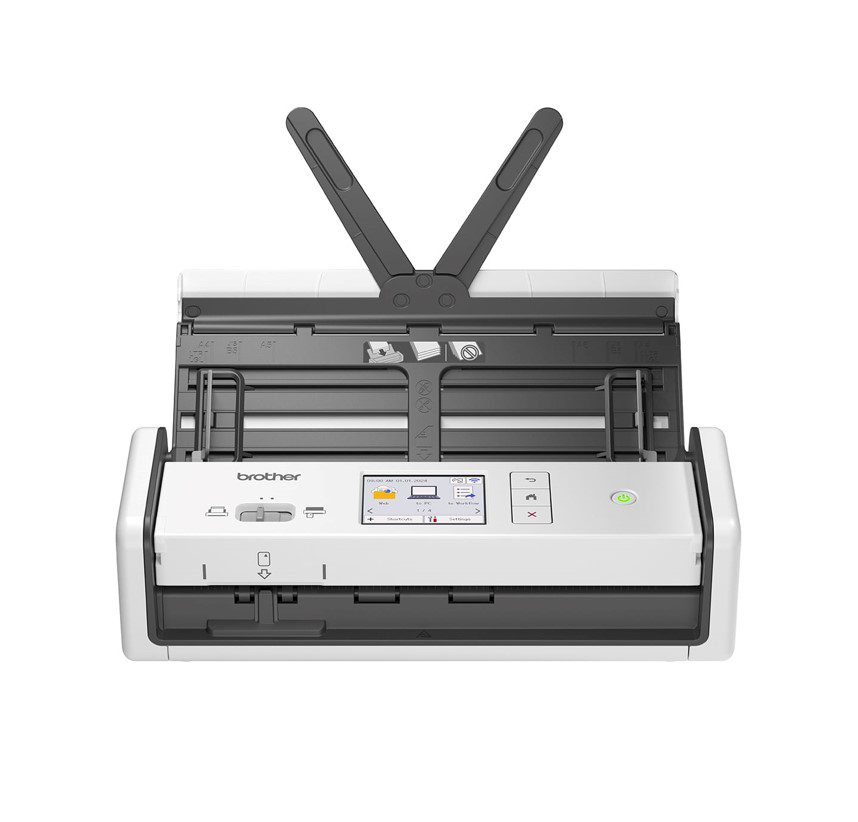








Brother ADS-1800W – Compact Document Scanner Solution
The Brother ADS-1800W is designed for enterprise use-cases where quick document scanning is required. Specifically, this product is ideal for offices with limited space. Additionally, its compact design makes it easy to place on any desk or table. The product’s WiFi connectivity allows for seamless integration with existing network infrastructure. Consequently, users can easily scan documents and transfer them to their preferred storage location.
Moreover, the Brother ADS-1800W features a touchscreen LCD display that makes it easy to navigate through settings and options. Importantly, this feature reduces the need for extensive user training. Furthermore, the product’s compact design makes it easy to transport and store when not in use.
Technical Specifications
| Scanner Type | Document Scanner |
| Connectivity | WiFi |
| Scanning Speed | 30 pages per minute |
| View all Brother Products → | |
Challenges Solved by Brother ADS-1800W
Bottlenecked deployment workflows and infrastructure scalability limits are common challenges faced by enterprises. However, with the Brother ADS-1800W, these issues can be mitigated. Specifically, this product allows for quick document scanning, reducing the time spent on manual data entry. Furthermore, its compact design makes it easy to place in any office setting, reducing the need for extensive cabling and infrastructure setup.
 Australian Logistics & B2B Support
As a 100% Aussie-owned and operated business, we are a trusted partner for Brother. We empower enterprise procurement with dedicated B2B account support and flexible payment options.
Frequently Asked Questions
What is the recommended scanning resolution for the Brother ADS-1800W?
The recommended scanning resolution for the Brother ADS-1800W is 300 dpi.
Can I scan documents wirelessly using the Brother ADS-1800W?
Yes, the Brother ADS-1800W features WiFi connectivity, allowing for seamless wireless scanning.
How do I troubleshoot common issues with the Brother ADS-1800W?
For assistance with troubleshooting, please contact our Sales Team at TECHOM Systems Sales.
Can I schedule regular maintenance for my Brother ADS-1800W to ensure optimal performance?
Yes, we recommend scheduling regular maintenance with our Sales Team to ensure optimal performance and extend the lifespan of your product.
What are the recommended system requirements for using the Brother ADS-1800W?
The recommended system requirements for using the Brother ADS-1800W include a computer with WiFi connectivity and a compatible operating system.
Ready to Deploy Brother *new*compact Document Scanner Withtouchscreen Lcddisplay & Wifi(30ppm) (ADS-1800W)?
Product Ref: TOS-873950 • Get enterprise pricing, volume discounts, and Australian support.