






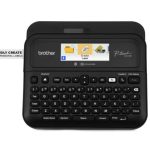
Brother PT-D610BT – Portable P-Touch Labeler
The Brother PT-D610BT is a portable p-touch labeler designed for various enterprise applications.
This solution features a color display and can connect to devices via Bluetooth or USB. It uses TZE tape, which is available in various widths from 3.5 to 24mm. The product is suitable for labeling equipment, inventory, and other assets in a business setting.
In addition to its connectivity options, the Brother PT-D610BT also features a built-in keyboard for easy input of text and numbers. This allows users to quickly create labels without needing to connect an external keyboard.
Technical Specifications
| Model | PT-D610BT |
| Category | Printers & Scanners |
| View all Brother Products → | |
Challenges Solved by Brother PT-D610BT
Bottlenecked deployment workflows can be a significant challenge for IT teams. They often struggle with manual labeling processes, which can lead to delays and errors. The Brother PT-D610BT can help streamline these workflows by providing a fast and accurate labeling solution.
This product can be used in various enterprise settings, including data centers, warehouses, and manufacturing facilities. It can help reduce the total cost of ownership by minimizing the need for manual labor and reducing the risk of errors.
By implementing the Brother PT-D610BT, businesses can improve their operational efficiency and reduce their reliance on manual labeling processes. This can lead to significant cost savings and improved productivity.
 Australian Logistics & B2B Support
As a 100% Aussie-owned and operated business, we are a trusted partner for Brother. We empower enterprise procurement with dedicated B2B account support and flexible payment options.
Frequently Asked Questions
What types of tape can I use with the Brother PT-D610BT?
The Brother PT-D610BT uses TZE tape, which is available in various widths from 3.5 to 24mm.
Can I connect multiple devices to the Brother PT-D610BT at the same time?
Yes, the Brother PT-D610BT can connect to multiple devices via Bluetooth or USB.
How do I reset the Brother PT-D610BT to its default settings?
To reset the Brother PT-D610BT to its default settings, press and hold the power button for 5 seconds.
Can I use the Brother PT-D610BT in a warehouse with high temperatures and humidity levels?
The Brother PT-D610BT is designed to operate in a variety of environments. However, it’s recommended to use it in a well-ventilated area to prevent overheating.
What kind of support does TECHOM Systems Sales offer for the Brother PT-D610BT?
TECHOM Systems Sales offers technical support and installation services for the Brother PT-D610BT. Our sales team can help you with any questions or concerns you may have about the product.
Ready to Deploy Brother Pc & Bluetooth Connectable Portable P Touch Labeller W/ Colour Display – 3.5-24mm Tze Tape Model (PT-D610BT)?
Product Ref: TOS-1575644 • Get enterprise pricing, volume discounts, and Australian support.