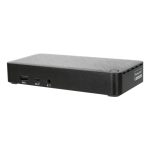










Lenovo 40BE0135AU – ThinkPad TB 4 Smart Dock G2
The ThinkPad TB 4 Smart Dock G2 is a cutting-edge docking solution designed to empower remote workforces and boost productivity. This advanced device enables users to transform their laptops into powerful workstations, complete with multiple display support, high-speed data transfer, and reliable power delivery. By providing a seamless and efficient way to connect to various peripherals, the ThinkPad TB 4 Smart Dock G2 helps to streamline workflows, reduce clutter, and enhance overall user experience.
The ThinkPad TB 4 Smart Dock G2 is engineered to meet the demands of modern enterprise environments, where flexibility, scalability, and security are paramount. Its robust architecture and rich feature set make it an ideal solution for organizations seeking to optimize their IT infrastructure, improve endpoint security, and enhance collaboration among remote teams.
IT professionals face numerous challenges in managing and supporting remote workforces. The ThinkPad TB 4 Smart Dock G2 addresses these challenges by providing a reliable, high-performance docking solution that is easy to deploy, manage, and maintain.
Technical Specifications
| Brand | Lenovo |
| SKU | 40BE0135AU |
| Category | Computers |
| Ports | 2 x DP, 1 x HDMI, 4 x USB, 2 x USB-C |
| Power Delivery | 100W |
| Display Support | Multi-display |
| View all Lenovo Products → | |
Challenges Solved by this Solution
The ThinkPad TB 4 Smart Dock G2 solves a range of pressing enterprise challenges, from bottlenecked deployment workflows to infrastructure scalability limits. By providing a robust and reliable docking solution, this device helps to mitigate risk, reduce IT overhead, and enhance operational efficiency. With its advanced features and flexible architecture, the ThinkPad TB 4 Smart Dock G2 is a strategic technical investment for organizations seeking to optimize their IT infrastructure, improve endpoint security, and drive business growth.
 Australian Logistics & B2B Support
As a 100% Aussie-owned and operated business, we are a trusted partner for Lenovo. We empower enterprise procurement with dedicated B2B account support and flexible payment options.
Frequently Asked Questions
How do I connect multiple displays to my laptop using the ThinkPad TB 4 Smart Dock G2?
Simply connect your laptop to the dock using a USB-C cable, and then connect your displays to the dock’s DP and HDMI ports.
Can I use the ThinkPad TB 4 Smart Dock G2 with my existing USB peripherals?
Yes, the dock features four USB ports, allowing you to connect your existing USB peripherals and enjoy high-speed data transfer.
How do I ensure that my ThinkPad TB 4 Smart Dock G2 is properly secured and managed within my organization?
The ThinkPad TB 4 Smart Dock G2 is designed to integrate seamlessly with your existing IT infrastructure, allowing you to easily manage and secure the device using your standard IT tools and protocols.
Can the TECHOM Systems Sales team help me with installation and support for my ThinkPad TB 4 Smart Dock G2?
Yes, our Sales team is happy to assist with installation, support, and any other questions you may have about the ThinkPad TB 4 Smart Dock G2.

Ready to Deploy Lenovo Thinkpad Tb 4 Smart Dock G2 7500 Dp(2), Hdmi(1), Usb(4), Usbc(2), 100w Pd, 3yr (40BE0135AU)?
Product Ref: TOS-1631678 • Get enterprise pricing, volume discounts, and Australian support.