









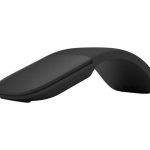
Microsoft CZV-00101 – Surface Arc Wireless Mouse
The Surface Arc Wireless Mouse is designed to provide a seamless and intuitive user experience. Its curved design allows for comfortable grip and precise control, making it an ideal companion for Surface Pro and Laptop users. This wireless mouse is engineered to deliver reliable connectivity and effortless navigation, empowering users to work efficiently in various environments. With its sleek and compact design, the Surface Arc Wireless Mouse is perfect for professionals who require a high-performance pointing device that complements their mobile workflow. In enterprise settings, this mouse can enhance productivity by providing a reliable and efficient way to interact with applications and data. Its wireless design also reduces clutter and minimizes the risk of damaged cables, making it a practical choice for busy workspaces.
The Surface Arc Wireless Mouse is designed to work in harmony with Surface devices, providing a cohesive and integrated user experience. Its advanced sensor technology ensures precise tracking and accurate cursor movement, allowing users to focus on their work without interruptions. This mouse is also designed to conserve battery life, providing extended usage on a single charge. With its durable construction and high-quality materials, the Surface Arc Wireless Mouse is built to withstand the demands of frequent use, making it a valuable investment for professionals who require a reliable pointing device.
In addition to its technical features, the Surface Arc Wireless Mouse is designed to enhance the overall user experience. Its ergonomic design provides a comfortable grip, reducing fatigue and discomfort during extended use. The mouse is also designed to be easy to use, with intuitive buttons and a smooth scrolling experience. This makes it an ideal choice for professionals who require a high-performance pointing device that is easy to use and navigate.
Technical Specifications
| Brand | Microsoft |
| SKU | CZV-00101 |
| Category | Tablets & Mobile |
| Compatibility | Surface Pro 11/10/8/9/X /11 Laptop 7/6/5/4 |
| Design | Curved design for comfortable grip |
| Connectivity | Wireless |
| Color | Black |
| View all Microsoft Products → | |
Challenges Solved by this Solution
For IT professionals, managing a fleet of devices can be a complex and time-consuming task. One of the major pain points is ensuring that all devices are equipped with reliable and efficient peripherals. The Surface Arc Wireless Mouse addresses this challenge by providing a high-performance pointing device that is designed to work seamlessly with Surface devices. This mouse can help streamline workflows, enhance productivity, and reduce IT overhead. By investing in this device, organizations can improve their overall technical ROI, mitigate risk, and enhance operational efficiency. With its durable construction and advanced sensor technology, the Surface Arc Wireless Mouse is a strategic technical investment that can help organizations achieve their goals.
 Australian Logistics & B2B Support
As a 100% Aussie-owned and operated business, we are a trusted partner for Microsoft. We empower enterprise procurement with dedicated B2B account support and flexible payment options.
Frequently Asked Questions
What is the typical battery life of a wireless mouse?
The battery life of a wireless mouse can vary depending on usage patterns and environmental factors. However, most wireless mice can provide several months of usage on a single charge.
How do I pair my wireless mouse with my Surface device?
Pairing your wireless mouse with your Surface device is a straightforward process. Simply insert the batteries, turn on the mouse, and follow the on-screen instructions to complete the pairing process.
Can I use my wireless mouse with other devices besides Surface?
While the Surface Arc Wireless Mouse is designed to work seamlessly with Surface devices, it can also be used with other devices that support wireless connectivity. However, the user experience may vary depending on the device and its operating system.
Can the TECHOM Systems Sales Team help me with installation and support?
Yes, the TECHOM Systems Sales Team can provide assistance with installation, support, and other technical inquiries. Please contact us for more information on our services and support options.
What is the recommended cleaning and maintenance procedure for my wireless mouse?
To keep your wireless mouse in good working condition, it’s recommended to clean it regularly with a soft cloth and avoid exposing it to harsh chemicals or extreme temperatures.

Ready to Deploy Microsoft Surface Arc Wireless Mouse Curved Design Surface Pro 11/10/8/9/x /11 Laptop 7/6/5/4- Black (CZV-00101)?
Product Ref: TOS-864526 • Get enterprise pricing, volume discounts, and Australian support.