









Ubiquiti UC-Display – UniFi Connect Display
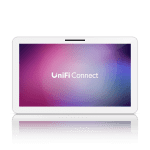
The Ubiquiti Connect Display is a 21.5-inch Full HD touchscreen device designed for seamless integration with UniFi Connect. This device boasts a sleek and modern design, making it an ideal addition to any enterprise environment. With its PoE++ capabilities, the display can be easily powered and connected to the network using a single cable, simplifying deployment and reducing clutter.
The UniFi Connect Display is engineered to provide a user-friendly interface for managing and monitoring UniFi networks. Its intuitive touchscreen allows administrators to easily navigate and configure network settings, making it an essential tool for IT professionals. The device also features multiple mounting options, providing flexibility in deployment and ensuring it can be easily integrated into existing network infrastructure.
In enterprise environments, the UniFi Connect Display can be used to streamline network management and monitoring. Its ability to provide real-time network insights and alerts enables IT teams to quickly identify and resolve issues, reducing downtime and improving overall network performance. The device can also be used to enhance network security, providing a centralized platform for monitoring and managing network access and authentication.
Technical Specifications
| Brand | Ubiquiti |
| SKU | UC-Display |
| Category | Networking |
| Screen Size | 21.5 inches |
| Resolution | Full HD |
| Touchscreen | Yes |
| Power | PoE++ |
| Mounting Options | Multiple |
| View all Ubiquiti Products → | |
Challenges Solved by this Solution
The UniFi Connect Display is designed to address common pain points in enterprise network management, including bandwidth bottlenecks, packet loss, and network latency. By providing a centralized platform for monitoring and managing network performance, the device enables IT teams to quickly identify and resolve issues, reducing downtime and improving overall network efficiency. The display’s intuitive interface also simplifies network configuration and troubleshooting, reducing the risk of human error and improving operational efficiency.
 Australian Logistics & B2B Support
As a 100% Aussie-owned and operated business, we are a trusted partner for Ubiquiti. We empower enterprise procurement with dedicated B2B account support and flexible payment options.
Frequently Asked Questions
What are the benefits of using a touchscreen display for network management?
A touchscreen display provides an intuitive and user-friendly interface for managing and monitoring network settings, making it easier for IT teams to configure and troubleshoot networks.
How can the UniFi Connect Display help improve network security?
The display provides a centralized platform for monitoring and managing network access and authentication, enabling IT teams to quickly identify and respond to security threats.
Can the UniFi Connect Display be used in conjunction with other network management tools?
Yes, the display can be used in conjunction with other network management tools to provide a comprehensive view of network performance and security.
Can the TECHOM Systems Sales team provide support for installing and configuring the UniFi Connect Display?
Yes, the TECHOM Systems Sales team can provide support for installing and configuring the UniFi Connect Display, as well as offer consulting services to help optimize network performance and security.
Ready to Deploy Ubiquiti Connect Display, 21.5′ Full Hd Poe++ Touchscreen Designed For Unifi Connect, Poe++ In, Multiple Mounting Options (UC-Display)?
Product Ref: TOS-854963 • Get enterprise pricing, volume discounts, and Australian support.