





A Microsoft 365 Migration Guide is essential for organizations transitioning from legacy systems to modern cloud-based productivity tools. As businesses embrace digital transformation, migrating to Microsoft 365 provides access to advanced collaboration tools, enterprise-grade security, cloud storage, and seamless communication capabilities. A well-planned migration strategy helps organizations unlock these benefits while avoiding common challenges associated with moving data, applications, and users to the cloud.
Following a structured Microsoft 365 Migration Guide ensures minimal downtime, maintains data integrity, and supports compliance requirements throughout the migration process. From evaluating your current IT environment to executing the migration and training employees, each stage contributes to a smooth transition. By adopting best practices, businesses can maximize their Microsoft 365 investment, improve operational efficiency, and ensure long-term success in a cloud-first workplace.
Planning the Microsoft 365 Migration
Migrating to Microsoft 365 requires careful preparation to ensure a smooth and successful transition. A well-planned strategy helps organizations minimize disruptions, protect critical data, and maximize the benefits of cloud-based productivity tools. By evaluating existing systems, selecting suitable Microsoft 365 Subscription Plans, and aligning migration goals with business needs, companies can create a solid foundation for long-term success.
1. Assess Your Current IT Infrastructure: Review your existing email platforms, file storage systems, applications, and collaboration tools to identify compatibility issues and migration requirements.
2. Define Clear Business Objectives: Establish goals such as improving teamwork, strengthening security, supporting remote work, or reducing operational costs to guide the migration process.
3. Select the Right Microsoft 365 Plan: Choose a solution that aligns with your organization’s size, budget, and requirements. The right Microsoft 365 License Australia option ensures access to the features and services your business needs.
4. Create a Migration Roadmap: Develop a timeline that includes data migration, testing, deployment, and user onboarding. A structured approach helps reduce risks and ensures business continuity.
5. Prepare Employees for the Transition: Provide training and communication to help users adapt quickly to new tools and workflows. Effective adoption is a key component of successful Microsoft 365 Solutions for Business.
This section supports your primary keyword Microsoft 365 Migration Guide through the heading while naturally incorporating the other target keywords throughout the content.
Key Steps in the Microsoft 365 Migration Process
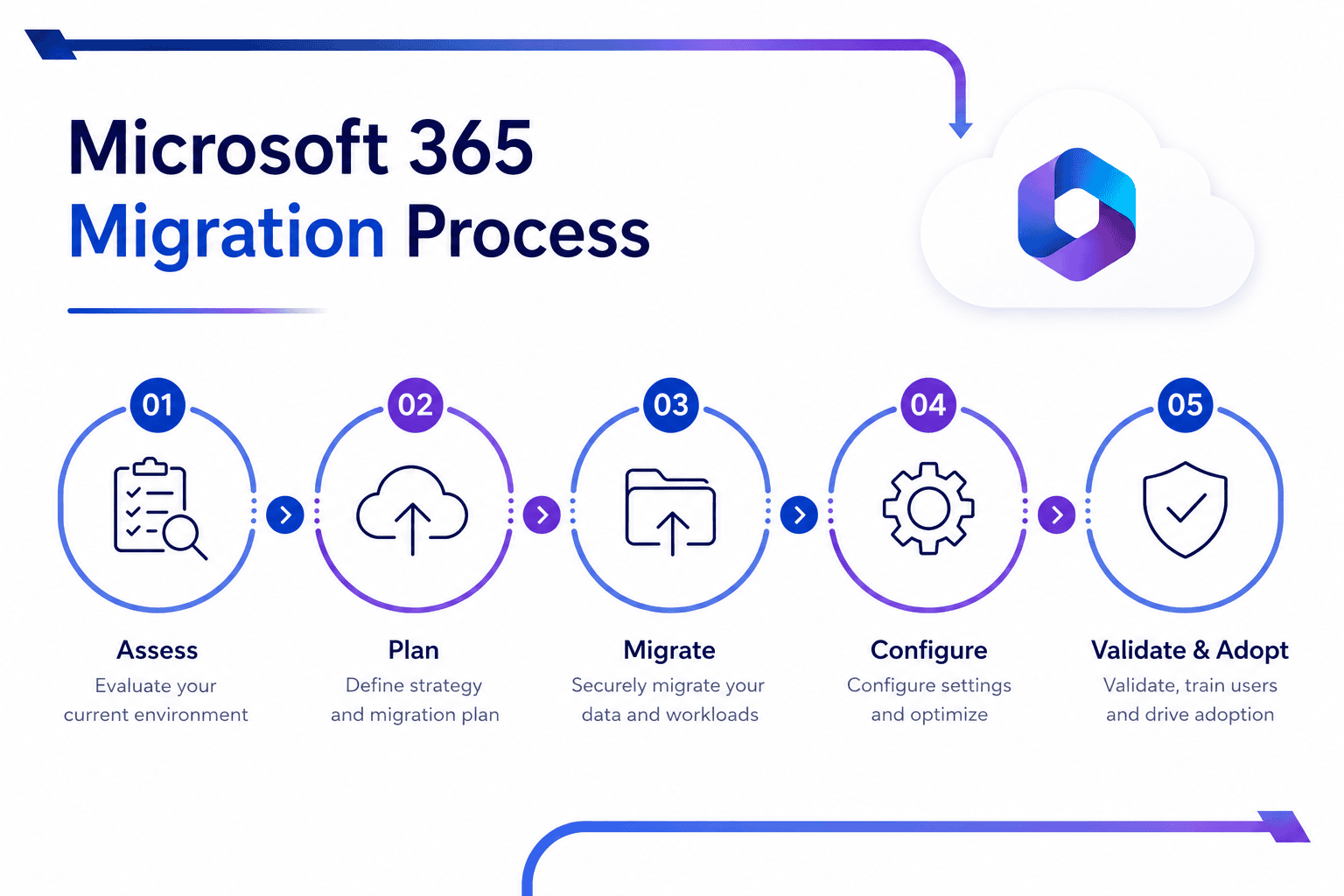
A successful migration requires careful planning, data assessment, tenant configuration, secure data transfer, user testing, and post-migration optimization. Choosing the right Microsoft 365 License Australia option also helps ensure businesses have the features, security, and scalability needed for a seamless transition.
1. Data Migration and User Setup
- Transfer email, contacts, and calendars using migration tools like Exchange Online Migration Assistant
- Set up user accounts with appropriate permissions and mailbox quotas
- Map on-premises Active Directory to Azure AD for seamless identity management
2. Testing and Validation
- Verify that all emails, contacts, calendars, and files have been migrated accurately.
- Test email functionality, including sending, receiving, and synchronisation across devices.
- Confirm that users can access shared files, folders, and OneDrive content without issues.
- Validate Microsoft Teams, SharePoint, and other collaboration tools to ensure seamless communication.
Common Challenges in Microsoft 365 Migration
Despite the benefits of cloud adoption, organizations may face challenges during migration, including data transfer issues, application compatibility concerns, security risks, user adoption barriers, and unexpected downtime. Implementing the right Microsoft 365 Solutions for Business and selecting an appropriate Microsoft 365 License Australia plan can help address these obstacles, ensuring a smoother transition, improved productivity, and long-term operational success.
1. Minimizing Downtime: Schedule migrations during off-peak business hours and use phased or hybrid deployment models to reduce disruption. This helps maintain business continuity and user productivity throughout the transition.
2. Preventing Data Loss: Implement comprehensive backup procedures and data validation checks before, during, and after migration. Regular verification ensures critical business information remains secure and accessible.
3. Managing Application Compatibility: Legacy applications and third-party integrations may not function properly after migration. Testing all business-critical applications beforehand helps identify and resolve compatibility issues early.
4. Ensuring User Adoption: Employees may be hesitant to adapt to new tools and workflows. Providing training, documentation, and ongoing support encourages successful adoption of Microsoft 365 Solutions for Business.
5. Maintaining Security and Compliance: Organizations must protect sensitive data during migration and comply with industry regulations. Choosing the right Microsoft 365 License Australia option provides access to advanced security, compliance, and identity management features that help safeguard business data.
Best Practices for a Successful Migration
Following proven migration strategies helps organizations reduce risks, improve user adoption, and maximize the value of their Microsoft 365 investment. Choosing the right Microsoft 365 Subscription Plans and implementing best practices can ensure a smooth transition with minimal disruption to business operations.
1. Adopt a Phased Migration Approach: Break the migration into manageable stages and begin with a pilot group. This allows teams to identify potential issues, test configurations, and make adjustments before a full-scale rollout.
2. Select the Right Microsoft 365 Subscription Plans: Evaluate business requirements, security needs, and user workloads before choosing a plan. The right subscription ensures access to the tools, storage, and features required for long-term success.
3. Prioritize Security and Compliance: Enable multi-factor authentication (MFA), data encryption, and access controls to protect sensitive information. Regular security audits help ensure compliance with industry regulations and company policies.
4. Provide User Training and Support: Offer training sessions, user guides, and ongoing support to help employees adapt to new applications and workflows. Well-informed users are more likely to embrace the platform and use it effectively.
5. Monitor and Optimize Post-Migration Performance: Continuously monitor system performance, user adoption, and security settings after migration. Regular optimization helps organizations improve productivity, address issues quickly, and maximize the benefits of Microsoft 365.
Tools and Technologies for Microsoft 365 Migration
Selecting the right migration tools is essential for a smooth and efficient transition to Microsoft 365. Businesses should evaluate solutions based on their data volume, complexity, security requirements, and chosen Microsoft 365 Subscription Plans. Using the appropriate tools can simplify data migration, reduce downtime, improve accuracy, and help ensure a successful migration experience.
| Tool | Features | Use Case | Integration |
|---|---|---|---|
| Exchange Online Migration Assistant | Automated mailbox migration, data validation | Large-scale email migration | Seamlessly integrates with Microsoft 365 |
| Microsoft 365 Migration Planner | Capacity planning, risk assessment | Pre-migration analysis | Works with Azure AD and Exchange |
| Third-party migration tools | Customizable workflows, batch processing | Complex environments with legacy systems | Supports API integrations |
“A well-documented Microsoft 365 Migration Guide is the difference between a successful migration and a chaotic rollout. Prioritize testing and user training to ensure adoption.” – John Carter, Microsoft MVP for Cloud Solutions
Why Partner with TECHOM Shop for Microsoft 365 Migration?
Migrating to Microsoft 365 involves more than simply moving data from one platform to another. It requires careful planning, technical expertise, and a strategy that aligns with your business goals. At TECHOM Shop, we help organizations navigate every stage of the migration journey, from assessing current systems and selecting suitable Microsoft 365 Subscription Plans to ensuring a secure and seamless deployment. Our team focuses on minimizing downtime, protecting critical business data, and delivering a smooth transition that supports productivity and business continuity.
With extensive experience in delivering Microsoft 365 Solutions for Business, TECHOM Shop provides personalized guidance and ongoing support tailored to your unique requirements. We also assist businesses in choosing the right Microsoft 365 License Australia option to ensure they have access to the features, security capabilities, and scalability needed for long-term success. By partnering with TECHOM Shop, organizations can confidently embrace Microsoft 365 while maximizing their return on investment and empowering teams to work more efficiently.
Frequently Asked Questions
1. What is Microsoft 365 migration?
Microsoft 365 migration is the process of moving emails, files, applications, user accounts, and business data from on-premises or legacy systems to the Microsoft 365 cloud environment. This transition helps organizations improve collaboration, strengthen security, enable remote work, simplify IT management, and enhance overall business productivity.
2. How long does a Microsoft 365 migration take?
The duration of a Microsoft 365 migration depends on factors such as data volume, number of users, existing infrastructure, and migration complexity. Small businesses may complete the process within a few days, while larger organizations with extensive data and complex environments may require several weeks for a successful migration.
3. How do I choose the right Microsoft 365 Subscription Plans for my business?
Selecting the right Microsoft 365 Subscription Plans requires evaluating your organization’s size, budget, security needs, compliance requirements, and collaboration goals. Businesses should compare available features, storage options, and productivity tools to ensure the chosen plan supports current operations while providing flexibility for future growth.
4. Will there be downtime during the migration process?
Downtime during migration can be significantly reduced with proper planning, testing, and phased deployment strategies. Many organizations use hybrid migration methods to maintain access to critical services while data is being transferred. This approach helps ensure business continuity and minimizes disruptions to employee productivity.
5. Why is selecting the correct Microsoft 365 License Australia important?
Choosing the right Microsoft 365 License Australia ensures your organization receives the appropriate applications, cloud storage, security features, and compliance capabilities. The correct licensing option helps control costs, improve operational efficiency, support business growth, and provide employees with the tools needed to work effectively and securely.
Conclusion
A successful Microsoft 365 migration requires careful planning, the right tools, and a well-structured implementation strategy. From assessing your current infrastructure and selecting suitable Microsoft 365 Subscription Plans to addressing migration challenges and following industry best practices, each step plays a crucial role in ensuring a seamless transition. By choosing the appropriate Microsoft 365 License Australia for your organization’s needs, businesses can unlock advanced productivity, collaboration, and security capabilities while supporting future growth.
Partnering with an experienced provider like TECHOM Shop can further simplify the migration process and help organizations maximize the value of their Microsoft 365 investment. With expert guidance, tailored solutions, and ongoing support, businesses can confidently move to a modern cloud environment, reduce operational complexity, and empower employees to work more efficiently in today’s digital workplace.
Contact TECHOM Shop today to discover the best Microsoft 365 solution for your organization and ensure a secure, seamless, and successful migration experience.

Peter Pawlak, Director of Sales and Customer Advocate, brings over 15 years of experience helping ambitious business owners grow with confidence. His mission is to empower people to start, build, and run their businesses successfully, turning ideas into thriving ventures. Peter’s passion for business transformation and his results-driven approach have been key to guiding entrepreneurs toward faster and smarter growth.