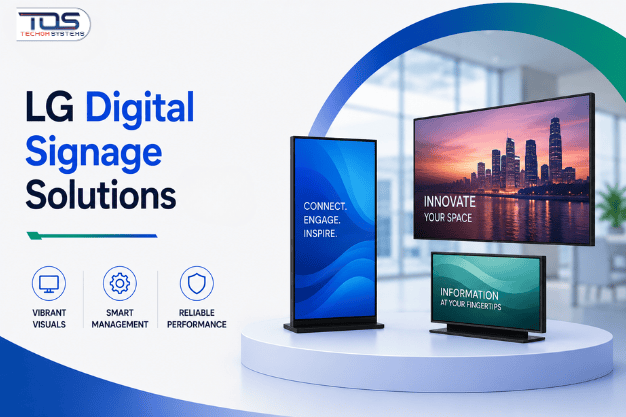
Australian organisations running several offices, showrooms or service branches face a common problem. Messaging drifts between locations. Branding looks inconsistent from one site to the next, and head office loses control of what customers and staff actually see. LG Digital Signage Solutions solve this by giving every location a unified, centrally managed visual communication network rather than a patchwork of mismatched screens.
This article is written for procurement leaders, IT managers, facilities managers and operations directors evaluating a smarter path forward. It explains why LG Digital Signage Solutions have become the standard choice for multi-site Australian businesses. How the right displays improve workplace productivity, and how to identify the Best LG Monitor for Productivity for different teams within the same organisation. Together, LG Digital Solutions and the Best LG Monitor for Productivity form one coordinated workplace technology strategy rather than two unrelated purchases. The goal is confident, informed investment, not another product spec sheet.
The Real Cost of Inconsistent Communication Across Multiple Sites
Growth creates fragmentation. A business that opens a second, third or tenth location often inherits whatever screens, monitors and printed signage each site manager could source locally. The result is a communication network built by accident, not by design.
Inconsistent signage does more than look untidy. It slows internal communication, confuses customers, and forces IT teams to manage dozens of unrelated devices instead of one coherent platform. Marketing messages arrive late. Safety notices go unseen. Meeting rooms run on ageing consumer televisions never built for daily commercial use.
Operations directors feel this most acutely during change. A pricing update, a new safety protocol or a rebrand should reach every site within minutes. Without a proper commercial display network, it can take days, and some locations are missed entirely.
This is the operational gap that LG Digital Signage Solutions are designed to close, replacing fragmented, ad-hoc screens with one consistent, business-grade communication layer across every site. Businesses that delay this decision usually find the cost of inconsistent communication, not the cost of LG Digital Signage Solutions, is what actually damages the bottom line.
Why Australian Businesses Invest in LG Digital Signage Solutions
Consumer television sets are built for lounge rooms, not eight-hour trading days or always-on meeting rooms. They overheat, they lack remote management, and they void their warranty under commercial use. This is the first reason businesses move to purpose-built LG Digital Signage Solutions, available through TECHOM Shop.
Commercial-grade LG displays are engineered for continuous operation, brighter panels for high-traffic areas, and remote content management across an entire site network. A head office team can update pricing, safety messaging or promotional content on every screen in every location from a single dashboard, without a technician visiting each branch.
That level of control changes how businesses operate day to day. Marketing teams push a new campaign to fifty screens in minutes instead of weeks. Facilities managers monitor screen health remotely instead of waiting for a complaint. IT teams manage one integrated platform instead of a dozen disconnected consumer devices.
Businesses exploring the full LG Digital Signage Solutions range can review the complete lineup on the LG Vendor Page, where commercial displays, video walls and interactive panels are grouped by application and business size.
The commercial case is straightforward. Reduced device failure, centralised control, and consistent branding all translate into measurable operational savings that consumer-grade alternatives simply cannot deliver.
Industry Deployment Examples
Retail and hospitality groups use LG Digital Signage to standardise pricing, promotions and wayfinding across every store, so a customer in Perth sees the same offer as a customer in Brisbane. Head office updates one campaign instead of coordinating fifty individual store managers.
Corporate offices and financial services firms deploy commercial displays in reception areas, boardrooms and open-plan floors to reinforce brand identity, share real-time performance dashboards, and reduce reliance on printed collateral that becomes outdated within weeks.
Healthcare and aged care providers rely on commercial-grade screens for patient information, wayfinding and staff communication, where reliability and always-on uptime are not optional extras but operational requirements.
Education and training organisations use large-format LG displays for timetables, campus announcements and lecture theatre presentations, replacing static noticeboards with content that updates automatically from a central system.
Across every one of these sectors, the underlying business driver is the same: LG Digital Signage Solutions remove manual, site-by-site communication work and replace it with one centrally managed, brand-consistent network. Whether the sector is retail, healthcare, education or corporate services, Digital Signage by LG Solutions are proving to be the common denominator behind faster, more consistent internal and customer-facing communication.
Building the Investment Case: An ROI Framework for Decision Makers
Procurement teams rarely approve technology spend without a clear return. LG Digital Signage Solutions earn their place in the budget through four measurable outcomes rather than a single vague productivity claim, and the same discipline should apply to any related monitor investment.
- First, reduced device turnover. Commercial-grade panels are built for extended daily use, cutting the replacement cycle compared with consumer screens pushed beyond their intended lifespan.
- Second, lower management overhead. Centralised content control means fewer site visits, fewer manual updates and less time spent chasing outdated signage across a growing network of locations.
- Third, faster internal communication. Safety alerts, policy changes and leadership updates reach every screen in every location within minutes, reducing the operational risk of delayed messaging.
- Fourth, stronger brand consistency, which research consistently links to greater customer trust and higher perceived business credibility across every touchpoint a customer or client encounters.
Together, these four factors build a defensible investment case that procurement and finance teams can approve with confidence, well beyond the upfront cost of the hardware itself.
Beyond the Signage Network: Choosing the Best LG Monitor for Productivity by Role
Digital signage solves communication across a site, but workplace productivity depends just as heavily on the individual monitor sitting on every desk. Identifying the Best LG Monitor for Productivity is not a single answer, because different roles place very different demands on a display. Choosing the Best LG Monitor for Productivity role by role, rather than issuing one standard screen company-wide, is where the real productivity gain is found.
Executives and managers who move between meetings and desk work benefit from a monitor that supports fast video calls, clear document review and minimal eye strain across a long day. Finance and administration teams working across spreadsheets and reporting tools need sharp text clarity and generous screen real estate for side-by-side comparisons. Designers, engineers and technical teams require colour accuracy and higher resolution, since even small display inaccuracies compound across a full working day of detailed visual work.
Matching Monitor Specifications to Workplace Roles
Remote and hybrid employees need a reliable, ergonomic monitor that reduces fatigue during back-to-back video meetings from a home office.
Customer-facing staff, including reception, sales and support teams, benefit from monitors that present information clearly to both the employee and the person standing opposite them. Analysts working across multiple data sources need additional screen space to compare figures without constant window switching, which is exactly why the Best LG Monitor for Productivity varies so much between departments.
Businesses can browse the Best LG Monitor for Productivity range for these exact scenarios directly through the LG vendor page, filtering by resolution, screen size and connectivity to match each role.
For everyday productivity roles, the LG 24” Full HD Monitor (SKU: 24U411-B.AAUQ) suits administration, reception and general office use, offering reliable clarity for document work and communication tools without unnecessary cost.
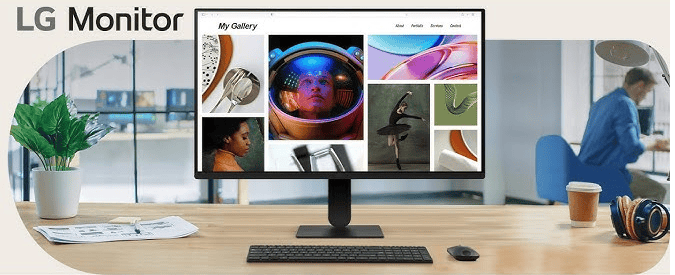
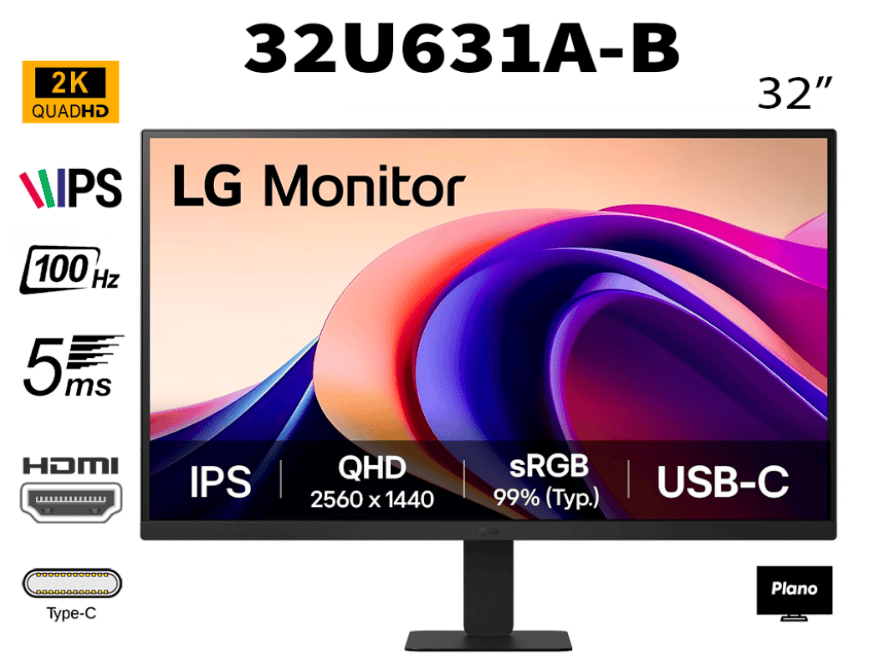
For teams handling detailed data, design review or multitasking across several applications, the LG 32″ QHD 100Hz USB-C Monitor (SKU: 32U631A-B) delivers the extra resolution, refresh rate and single-cable connectivity that demanding workflows require.
| COMMERCIAL INSIGHT Matching the monitor to the role, rather than issuing one standard screen business-wide, consistently produces a better return than a single blanket purchase across every department. |
Comparing LG Monitor Options for Common Workplace Roles
The table below outlines how each recommended model aligns with typical Australian workplace requirements, helping teams identify the Best LG Monitor for Productivity for their specific function.
| Workplace Role | Recommended Model | Key Benefit |
|---|---|---|
Administration and Reception | LG 24” Full HD Monitor (24U411-B.AAUQ) | Reliable clarity for daily document and communication tasks |
Finance and Reporting | LG 24” Full HD Monitor (24U411-B.AAUQ) | Cost-effective screen real estate for spreadsheet-heavy work |
Design and Engineering | LG 32″ QHD 100Hz USB-C Monitor (32U631A-B) | Higher resolution and colour accuracy for detailed visual work |
Hybrid and Remote Staff | LG 32″ QHD 100Hz USB-C Monitor (32U631A-B) | Single-cable connectivity and smoother video calls |
Data Analysts | LG 32″ QHD 100Hz USB-C Monitor (32U631A-B) | Extra screen space for multi-source comparison |
A Simple Decision Matrix for Facilities and IT Teams
| Business Need | Recommended LG Solution | Primary Outcome |
|---|---|---|
Multi-site brand consistency | LG Digital Signage Solutions | Centralised content control across every location |
Reception and lobby communication | Commercial display network | Professional first impression, reduced printed signage |
| Meeting room collaboration | Commercial-grade display | Reliable daily use without consumer warranty limitations |
Individual desk productivity | Best LG Monitor for Productivity by role | Reduced fatigue, faster task completion |
| Remote and hybrid teams | 32″ QHD USB-C monitor | Simplified setup, improved video call clarity |
| COMMERCIAL INSIGHT Businesses that separate the signage network decision from the individual monitor decision typically overspend, because both budgets end up solving the same underlying goal in isolation rather than as one coordinated workplace technology strategy. |
Buyer Checklist Before You Invest
- Confirm how many sites need centralised content management under one LG Digital Signage Solutions network.
- Identify which teams need a role-specific upgrade to the Best LG Monitor for Productivity, rather than a single standard screen.
- Check existing warranty terms on any consumer displays currently used in place of proper LG Digital Signage Solutions.
- Map which locations experience the slowest communication updates today.
- Confirm connectivity requirements, including USB-C, for hybrid and remote workstations choosing the Best LG Monitor for Productivity.
- Request current pricing and availability before finalising next year’s technology budget.
Implementation Planning Recommendations
Start with a single pilot site or department before committing to a full LG Digital Signage Solutions rollout. This validates content management workflows and confirms staff adoption before wider investment.
Sequence the rollout by operational priority. High-traffic customer areas and safety-critical communication points typically deliver the fastest visible return, followed by meeting rooms and then individual desk upgrades. Involve IT early. Centralised content management, network requirements and device provisioning are far simpler to plan before hardware arrives than to retrofit afterwards.
Review procurement in stages rather than a single bulk order, allowing budget flexibility as different sites and departments reach their rollout window.
Key Takeaways
- LG Digital Signage Solutions replace fragmented, site-by-site screens with one centrally managed communication network.
- Commercial-grade displays within LG Digital Signage Solutions are built for continuous daily use, unlike consumer televisions pushed beyond their intended purpose.
- The Best LG Monitor for Productivity depends on the role, not a single business-wide standard.
- Pairing LG Digital Signage Solutions with the Best LG Monitor for Productivity addresses communication and individual output together.
- A staged rollout, starting with a pilot site, reduces risk and validates return before full investment.
- TECHOM Shop supports Australian businesses through every stage of the buying decision.
Frequently Asked Questions
#1. What makes LG Digital Signage Solutions different from consumer television screens?
Commercial-grade LG displays are built for extended daily operation, brighter panels for high-traffic areas, and centralised remote content management, none of which consumer televisions are designed or warrantied to support.
#2. How do I identify the Best LG Monitor for Productivity for my team?
Match the monitor to the role. Administration and reception teams often benefit from reliable Full HD monitors. Design and engineering professionals usually require higher screen resolutions. Data-intensive roles also benefit from additional screen space and connectivity. A QHD USB-C monitor supports these requirements effectively. It delivers sharper visuals, streamlined connectivity, and improved productivity across demanding workloads.
#3. Can LG Digital Signage Solutions be managed across multiple business locations from one place?
Yes. Centralised content management is a core feature of LG Digital Signage Solutions, allowing head office teams to update pricing, safety messaging and campaigns across every connected site without visiting each location individually.
#4. Is it worth upgrading individual desk monitors alongside a signage network investment?
Yes, especially for teams that depend on screen clarity and reliable connectivity. The Best LG Monitor for Productivity helps employees work more efficiently. LG Digital Signage Solutions improve communication across workplace locations. Together, these technologies support productivity at both the individual and organisational levels. This combination helps create a more connected, efficient, and productive workplace environment.
#5. How can I get accurate pricing for LG Digital Signage Solutions and recommended monitors?
Australian businesses can Request A Quote directly through TECHOM Shop. The team can confirm current product availability. They can also provide up-to-date pricing for recommended models. This helps organisations plan purchases with greater confidence. It also supports more accurate budgeting and deployment decisions.
Ready to Standardise Your Workplace Technology?
Fragmented screens and mismatched monitors quietly cost Australian businesses time, consistency and customer trust every day. TECHOM Shop helps procurement, IT and facilities teams move to a properly specified LG Digital Signage Solutions network, paired with the Best LG Monitor for Productivity for every role.
Explore the full LG Digital Signage Solutions range available through the LG vendor page. Compare display options against your current workplace setup. Review key features, specifications, and availability before your budget cycle closes. When you’re ready to move forward, Request Pricing from TECHOM Shop. Speak with our specialists about the right LG Digital Signage Solutions. Identify the Best LG Monitor for Productivity configuration for your workplace requirements.

Peter Pawlak, Director of Sales and Customer Advocate, brings over 15 years of experience helping ambitious business owners grow with confidence. His mission is to empower people to start, build, and run their businesses successfully, turning ideas into thriving ventures. Peter’s passion for business transformation and his results-driven approach have been key to guiding entrepreneurs toward faster and smarter growth.