










Astrotek AT-DPHDMI-2 – DisplayPort to HDMI Adapter Converter Cable
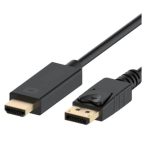
The DisplayPort to HDMI Adapter Converter Cable is designed to provide a seamless connection between DisplayPort-enabled PCs or laptops and HDMI-enabled HDTVs, projectors, or displays. This device is engineered to support high-definition video resolutions up to 1080p, ensuring crisp and clear visuals for presentations, video conferencing, or entertainment. With its gold-plated connectors, it ensures reliable data transfer and minimizes signal degradation. The adapter’s compact design and 2-meter cable length provide flexibility and convenience for users to position their devices as needed. In enterprise environments, this adapter can be used to connect laptops to conference room displays or projectors for presentations, training sessions, or video conferencing. It can also be used to connect PCs to multiple monitors, enhancing productivity and multitasking capabilities.
The adapter’s ability to support high-definition video resolutions makes it an ideal solution for applications that require high-quality visuals, such as video editing, graphic design, or gaming. its compatibility with both DisplayPort and HDMI devices makes it a versatile solution for connecting different devices in various environments. The adapter’s plug-and-play design ensures easy installation and minimizes downtime, making it a reliable choice for enterprise users.
In terms of technical features, the adapter’s support for high-definition video resolutions and its gold-plated connectors ensure reliable data transfer and minimize signal degradation. The adapter’s compact design and 2-meter cable length provide flexibility and convenience for users to position their devices as needed.
Technical Specifications
| Brand | Astrotek |
| SKU | AT-DPHDMI-2 |
| Category | Cables & Adapters |
| Length | 2m |
| Connectors | Male to Male |
| Resolution Support | 1080p |
| Connectivity | DisplayPort to HDMI |
| View all Astrotek Products → | |
Challenges Solved by this Solution
Many organizations face challenges when connecting their devices to displays or projectors, particularly when dealing with different connector types. This can lead to decreased productivity, increased downtime, and frustration among employees. The DisplayPort to HDMI Adapter Converter Cable solves these problems by providing a seamless connection between DisplayPort-enabled devices and HDMI-enabled displays or projectors. By using this adapter, organizations can enhance their productivity, reduce downtime, and improve the overall user experience. The adapter’s high-definition video resolution support and gold-plated connectors ensure reliable data transfer and minimize signal degradation, making it a strategic technical investment for any organization.
 Australian Logistics & B2B Support
As a 100% Aussie-owned and operated business, we are a trusted partner for Astrotek. We empower enterprise procurement with dedicated B2B account support and flexible payment options.
Frequently Asked Questions
What is the maximum resolution supported by this adapter?
This adapter supports high-definition video resolutions up to 1080p.
Can I use this adapter to connect my laptop to a projector for presentations?
Yes, this adapter is designed to provide a seamless connection between DisplayPort-enabled laptops and HDMI-enabled projectors or displays.
Is this adapter compatible with both DisplayPort and HDMI devices?
Yes, this adapter is compatible with both DisplayPort and HDMI devices, making it a versatile solution for connecting different devices in various environments.
Can the TECHOM Systems Sales team help me with installation support for this adapter?
Yes, our sales team can provide assistance with installation support, as well as answer any questions you may have about the product.

Ready to Deploy Astrotek Displayport Dp To Hdmi Adapter Converter Cable 2m – Male To Male 1080p Gold-plated For Pc/laptop To Hdtvs Projectors Displays (AT-DPHDMI-2)?
Product Ref: TOS-1568464 • Get enterprise pricing, volume discounts, and Australian support.