









StarTech.com 135S-PRIVACY-SCREEN – Surface Book Laptop Privacy Screen
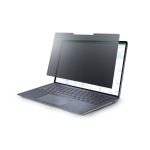
The 13.5 Surface Book Laptop Privacy Screen is designed to protect sensitive information from prying eyes. This device is perfect for enterprise environments where data security is paramount. The privacy screen works by limiting the viewing angle of the laptop screen, making it difficult for others to see what’s on the screen. This is especially useful in open office spaces, public areas, or when working on confidential projects. The screen also helps to reduce glare and reflections, improving visibility and reducing eye strain. In addition, the privacy screen is easy to install and remove, making it a convenient solution for businesses that need to protect sensitive information.
The 13.5 Surface Book Laptop Privacy Screen is a must-have for any business that handles sensitive information. The screen is designed to fit seamlessly onto the Surface Book laptop, providing a snug and secure fit. The screen is also designed to be durable and long-lasting, withstanding the rigors of daily use. With the 13.5 Surface Book Laptop Privacy Screen, businesses can rest assured that their sensitive information is protected from prying eyes.
data security is more important than ever. The 13.5 Surface Book Laptop Privacy Screen provides a simple and effective solution for businesses that need to protect sensitive information. Whether you’re working on confidential projects, handling sensitive customer data, or simply need to protect your business’s intellectual property, the 13.5 Surface Book Laptop Privacy Screen is the perfect solution.
Technical Specifications
| Brand | StarTech.com |
| SKU | 135S-PRIVACY-SCREEN |
| Category | Keyboards & Mice |
| Screen Size | 13.5 inches |
| Screen Type | Privacy Screen |
| Compatibility | Surface Book Laptop |
| Material | Durable and long-lasting material |
| View all StarTech.com Products → | |
Challenges Solved by this Solution
Businesses face a multitude of challenges protecting sensitive information. From data breaches to intellectual property theft, the risks are real and the consequences can be devastating. The 13.5 Surface Book Laptop Privacy Screen provides a simple and effective solution for businesses that need to protect sensitive information. By limiting the viewing angle of the laptop screen, the privacy screen helps to prevent prying eyes from seeing confidential data. This can help to reduce the risk of data breaches, protect intellectual property, and give businesses peace of mind. With the 13.5 Surface Book Laptop Privacy Screen, businesses can focus on what matters most – growing and succeeding.
 Australian Logistics & B2B Support
As a 100% Aussie-owned and operated business, we are a trusted partner for StarTech.com. We empower enterprise procurement with dedicated B2B account support and flexible payment options.
Frequently Asked Questions
How does the 13.5 Surface Book Laptop Privacy Screen work?
The 13.5 Surface Book Laptop Privacy Screen works by limiting the viewing angle of the laptop screen, making it difficult for others to see what’s on the screen.
Is the 13.5 Surface Book Laptop Privacy Screen easy to install?
Yes, the 13.5 Surface Book Laptop Privacy Screen is easy to install and remove, making it a convenient solution for businesses that need to protect sensitive information.
Can the 13.5 Surface Book Laptop Privacy Screen be used on other laptops?
No, the 13.5 Surface Book Laptop Privacy Screen is designed for the Surface Book laptop.
How can I get help with installation or design services for the 13.5 Surface Book Laptop Privacy Screen?
The TECHOM Systems Sales Team can help with installation, design services, and any other questions you may have.
What is the shipping policy for the 13.5 Surface Book Laptop Privacy Screen?
Please contact the TECHOM Systems Sales Team for information on shipping policies and procedures.

Ready to Deploy StarTech.com 13.5 Surface Book Laptop Privacy Screen (135S-PRIVACY-SCREEN)?
Product Ref: TOS-203754 • Get enterprise pricing, volume discounts, and Australian support.